
For Australian cafes and coffee shops
Cafe Online Ordering, Made for the Morning Rush
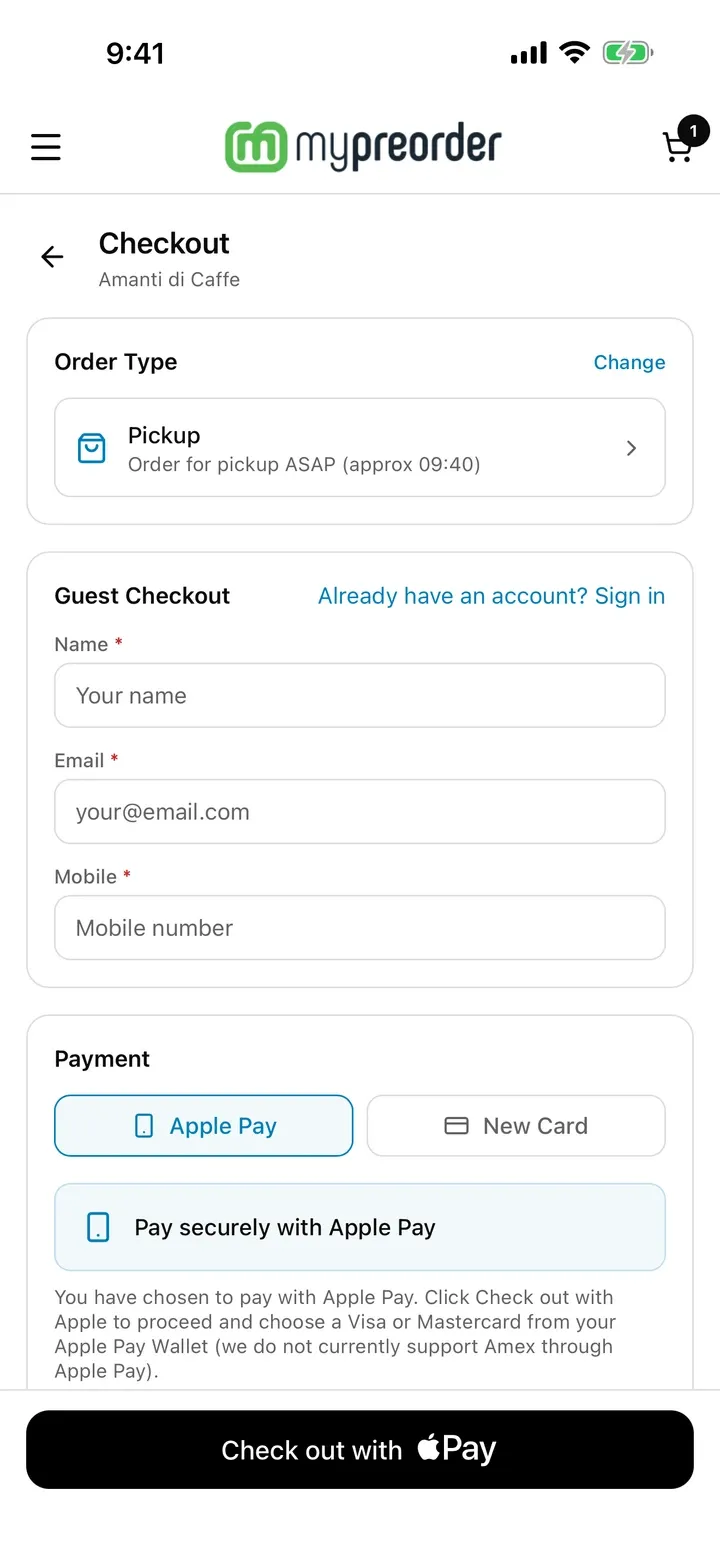
Your regulars order and pay on their phone before they arrive, choose a pickup time and walk straight past the queue. Every order lands on your docket printer, kitchen screen or POS, already paid.
- No commission on orders
- Works with your POS
- Free plan to start
- Since 2011 commission-free online ordering
- Works with Square, Lightspeed, Uniwell, Triniteq and Tyro Connect POS
- Australian support team, based in Perth
How Cafe Online Ordering Works
Three steps for your customer. Behind the counter, the only change is a shorter queue.
Order Ahead
From your ordering page, the mypreorder app or a QR code on the table. Size, milk, sugar and extra shots are all options, each with its own price.
Pay Online
Apple Pay, Google Pay, Visa, Mastercard, Amex or PayPal. Every order is paid before you make it, so there are no no-shows.
Collect Without Queuing
They choose ASAP or a time. The order prints or appears on your kitchen screen with its pickup time, and they walk in and grab it.
Flat out? Lengthen your lead time from the kitchen display, and new orders get a later pickup time until things calm down.
Built for Your Regulars
Most cafe trade is the same faces every morning. These features are for them.
Favourites and Reorders
All plansRegulars save their usual and order it again without building it from scratch.
Pickup Times
All plansASAP or a chosen time within your trading hours, so the 8am rush spreads out.
Digital Loyalty Cards
All plansReward regulars with points or a free coffee, taken off automatically at checkout.
Promo Codes
All plansRun a quiet-afternoon special, or welcome new customers with a code.
Neighbourhood Discounts
Growth & Pro plansSpecials for staff at the offices and shops around you.
Catering Orders
Growth & Pro plansOffice platters and big coffee runs ordered in advance, with their own rules.
Every Way Your Customers Order
One menu runs all of them, so a new special or price change shows up everywhere at once.
QR Code Table Ordering
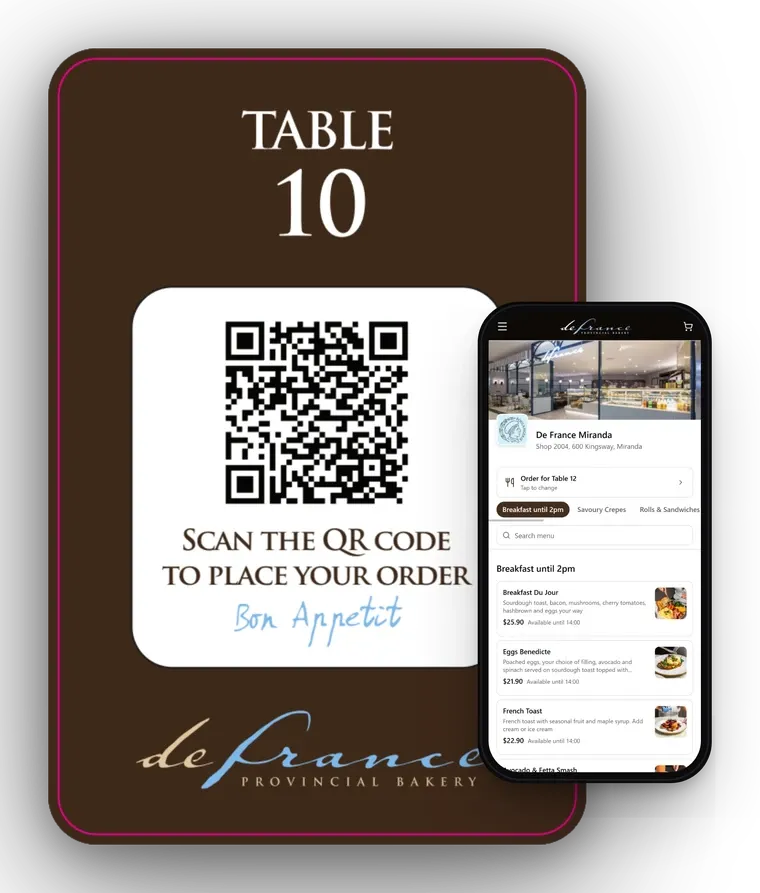
Put a QR code on each table. Customers scan it, order and pay from their seat, and the order reaches your kitchen with their table number. A second coffee no longer means another trip to the counter.
More on QR code ordering →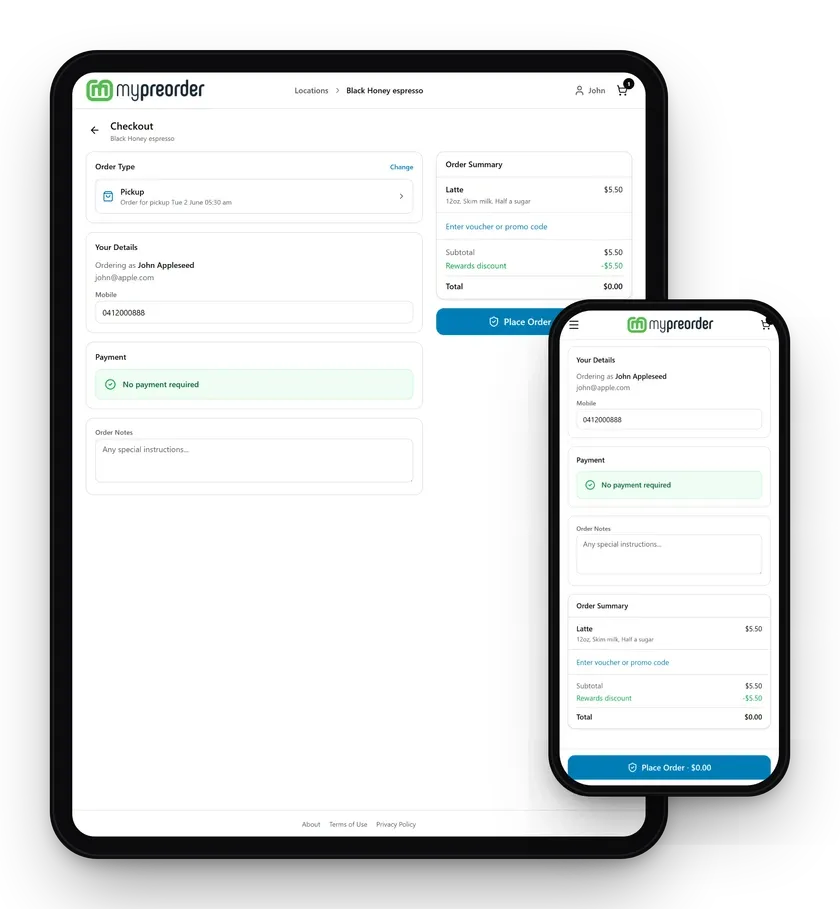
The mypreorder App, or Your Own
Every plan lists your cafe in the mypreorder app for iOS and Android, where customers find you and order ahead. Loyalty rewards come off automatically at checkout, like the free latte here.
On the Pro plan you get your own branded iOS and Android apps and ordering website, with your logo and colours.
More on branded apps →Works With Your POS
Online orders go where your team already works: into your POS, onto paper, or both.
Your POS
Orders go straight into Square, Lightspeed, Uniwell, Triniteq or a POS connected through Tyro Connect, so your sales reporting stays in one place. With Square and Lightspeed, your menu syncs too.
See integrations →Docket Printers
Orders print at the coffee machine or in the kitchen. mypreorder works with Star CloudPRNT printers such as the mC-Print3.
One Menu for Everything
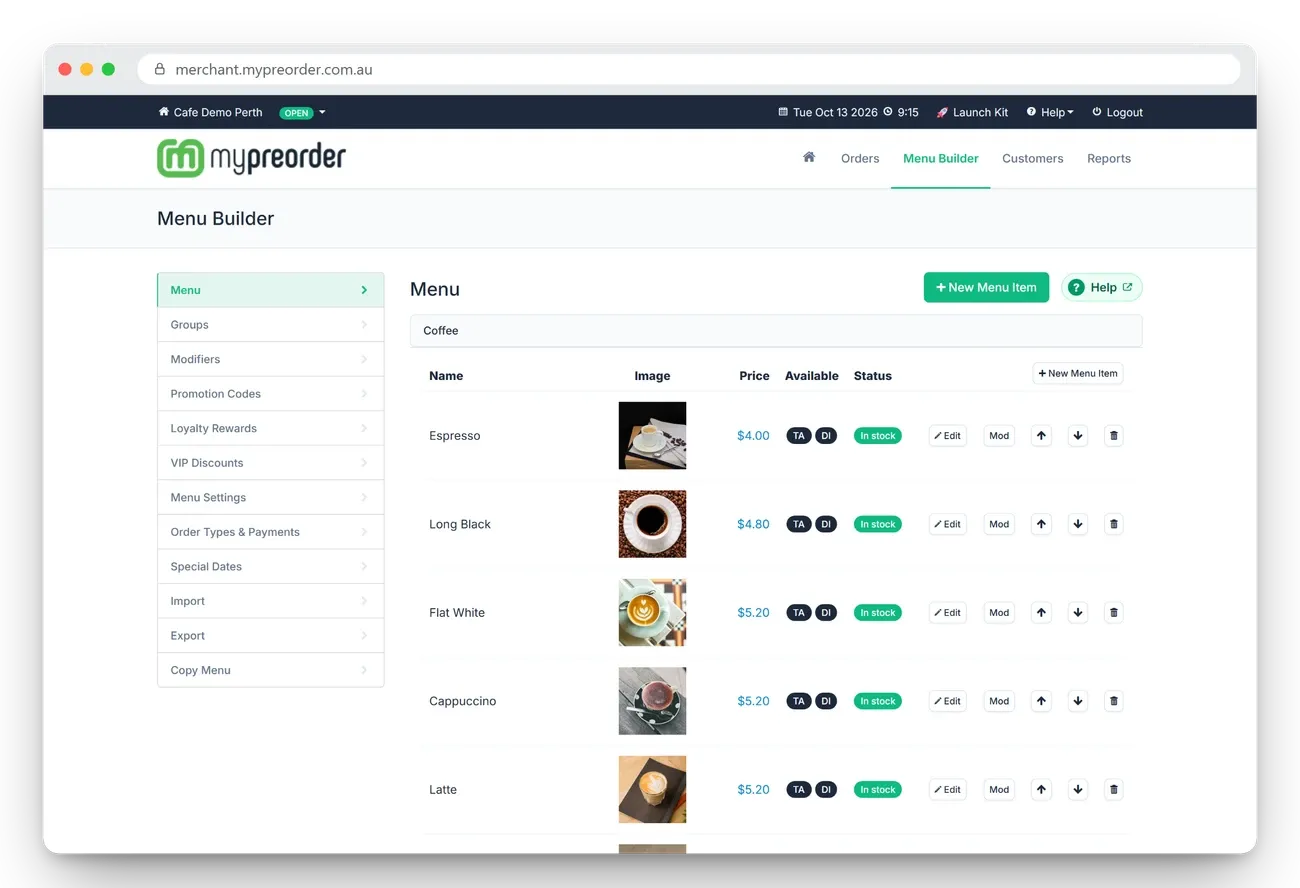
Build your menu once in the merchant portal, with photos, sizes, milks and extras. Change a price or add a special and it updates online, in the app and at the tables.
In Your Cafe Too
The same menu runs your counter, your kitchen screen and your kiosk. All three are software, on your own tablets and touch-screens.
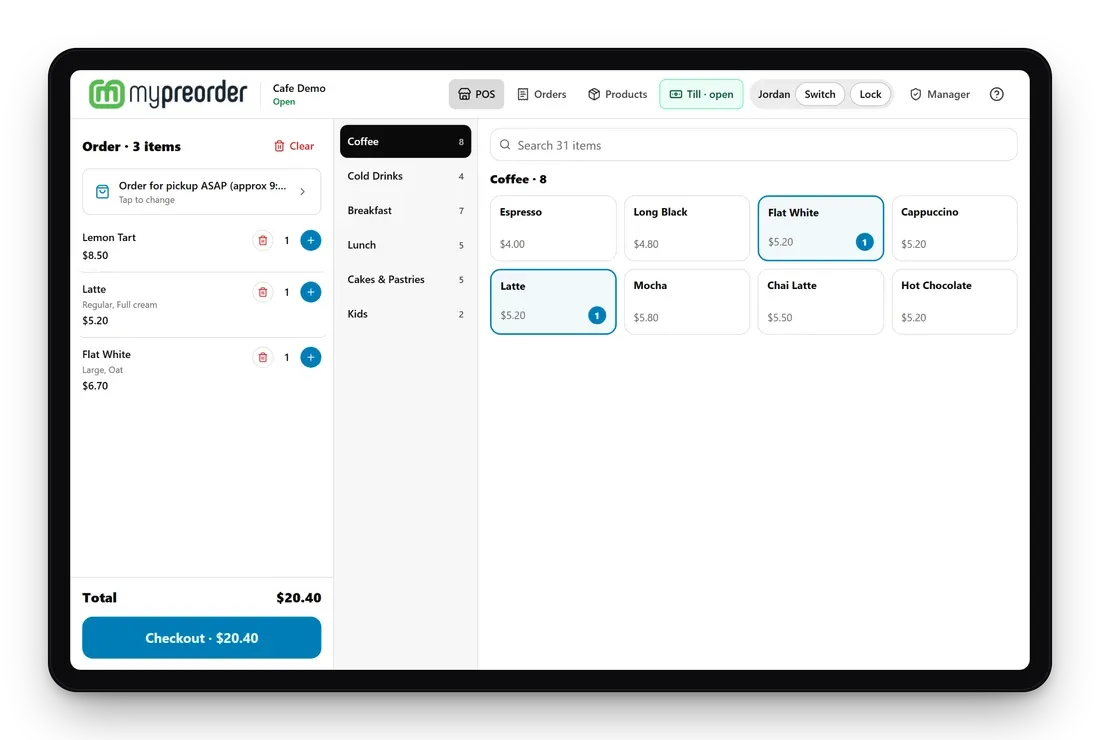
Point of Sale (POS)
Staff take counter and phone orders on a tablet, with EFTPOS payments via Linkly. 1 licence per store included. Additional licences can be purchased.
See the POS →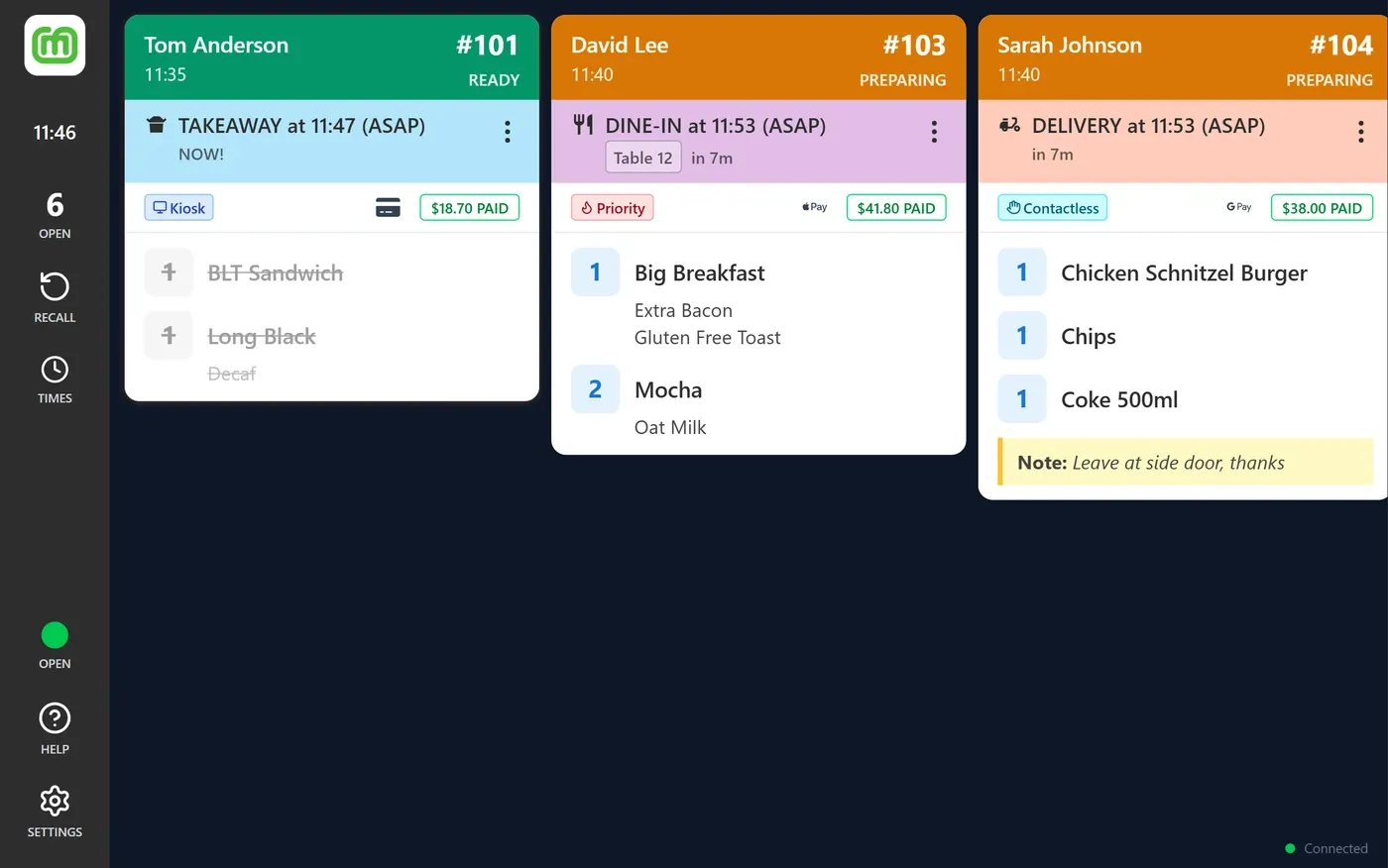
Kitchen Display System (KDS)
Every order on a screen, with lead-time control and order recall. 1 KDS licence per store included. Additional licences can be purchased.
See the KDS →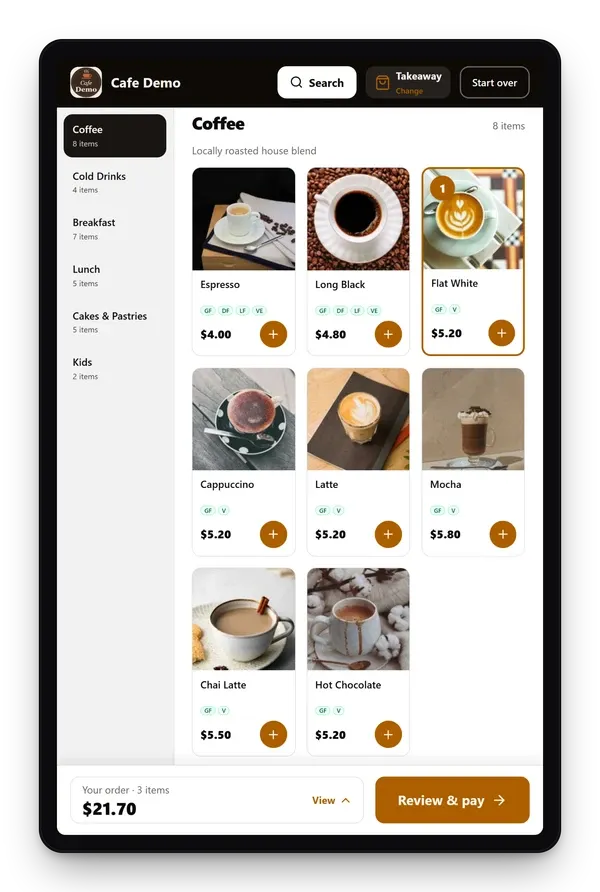
Self-Ordering Kiosk
Customers order for themselves when the line backs up, and pay on your EFTPOS terminal beside the kiosk. 1 kiosk licence per store included. Additional kiosk licences can be purchased.
See the kiosk →What Commission-Free Means
Delivery marketplaces take a percentage of every order. On a $5 flat white, that cut comes straight out of a thin margin. mypreorder doesn't take one.
A delivery marketplace
- A percentage of every order
- Customers belong to the marketplace
- Your cafe listed next to the competition
mypreorder
- A monthly plan, starting with a free plan, plus a card processing fee on online payments
- Customer details stay yours: sync them to Mailchimp or MailerLite, or export them any time
- Customers order from your own page, your QR codes or the mypreorder app
In-store card payments go through your own EFTPOS terminal, at the rates your bank or Tyro sets. Compare plans on mypreorder.com.au →
What You Need to Get Started
mypreorder is software only. It runs on devices you already own, or ones you buy from any supplier.
Your Menu and Logo
Send them to us and we'll set up your online store. Set-up is free on every plan.
A Phone, Tablet or Computer
To see and manage orders in the merchant portal or on the kitchen display.
A Docket Printer
For paper tickets at the coffee machine.
Your POS
If you use one we integrate with, orders go straight into it.
On the free Starter plan, online payments go through our gateway and settle weekly, so there's no payment account to apply for. Paid plans settle daily to your own merchant account.
What Cafe Owners Say
"With the ability to pre-order and set a pickup time, they can skip the queue and grab their coffee and toastie without the wait. Something our regulars absolutely love, especially during busy rush hours."
"Customers love how easy it is to use and set up favourites for repeat orders. Our team love the printed order tickets. And I love the seamless integration with our POS…"
"mypreorder is remarkable, it enables our business to grow across various sites with simple Copy Menu implementing. It is cost effective, easy to use…"
Choosing a Cafe Online Ordering System
Questions to ask any provider, and how mypreorder answers them.
| Ask | Why it matters to a cafe | mypreorder |
|---|---|---|
| Is there a commission on each order? | Coffee margins are thin, and a cut of every small order adds up. | No commission. A monthly plan and a card fee on online payments. |
| Can customers choose a pickup time? | It spreads the rush and stops coffees going cold on the bench. | ASAP or a set time, with lead times you can change during service. |
| Does it handle coffee options properly? | Size, milk, sugar, extra shot and decaf each need a choice and a price. | Options with their own prices on every item. |
| Will it work with my POS? | It keeps sales reporting in one place. | Square, Lightspeed, Uniwell, Triniteq and Tyro Connect POS, or the mypreorder POS on Growth and Pro. |
| Who owns the customer list? | Your regulars are your business. | You do. Sync it to Mailchimp or MailerLite, or export it any time. |
| Do customers have to download an app? | Plenty won't, just to buy one coffee. | No. Web ordering and table QR codes work in any phone browser. |
| Who helps when something goes wrong? | The morning rush won't wait. | An Australian team, doing this since 2011. Email support on every plan, phone and remote support on paid plans. |
Cafe Online Ordering FAQ
What is cafe online ordering?
Customers order and pay for coffee and food on their phone, from your ordering page, an app or a QR code at the table. The order comes through to your counter, kitchen screen or POS already paid, with a pickup time or a table number.
Do my customers need to download an app?
No. They can order in any phone browser from your ordering link or a table QR code. Your cafe is also listed in the mypreorder app for iOS and Android, and the Pro plan adds your own branded apps.
Do you take a commission on orders?
No. You pay a monthly plan, with a free plan to start, and a card processing fee on online payments. No percentage is taken from your orders.
Does it work with my POS?
Orders can go straight into Square, Lightspeed, Uniwell, Triniteq and POS systems connected through Tyro Connect. With Square and Lightspeed, your menu syncs from the POS too. If you don't have a POS, the Growth and Pro plans include the mypreorder POS.
Can customers order from the table?
Yes. Put a QR code on each table. Customers scan it, order and pay, and the order reaches you with their table number.
Can I take orders at the counter too?
Yes. The Growth and Pro plans include the mypreorder point of sale (POS) for counter and phone orders, and a self-ordering kiosk. Every plan includes a kitchen display system (KDS). They all use the same menu as your online ordering.
What hardware do I need?
Nothing new to start. A phone, tablet or computer you already have will show your orders, and a docket printer or kitchen display is optional. mypreorder is software only and doesn't sell hardware, so you can use what you have or buy from any supplier.
Is mypreorder available in New Zealand?
Yes. New Zealand cafes can sign up at mypreorder.co.nz, with pricing in NZD.
How do I get started?
Sign up at mypreorder.com.au and send us your menu and logo. We set up your online store, free on every plan, and you share your ordering link and QR codes with customers.
Start Taking Coffee Orders Online
- Sign up at mypreorder.com.au
- Send us your menu and logo
- Share your link and QR codes
Or call 1300 223 130 · sales@mypreorder.com.au